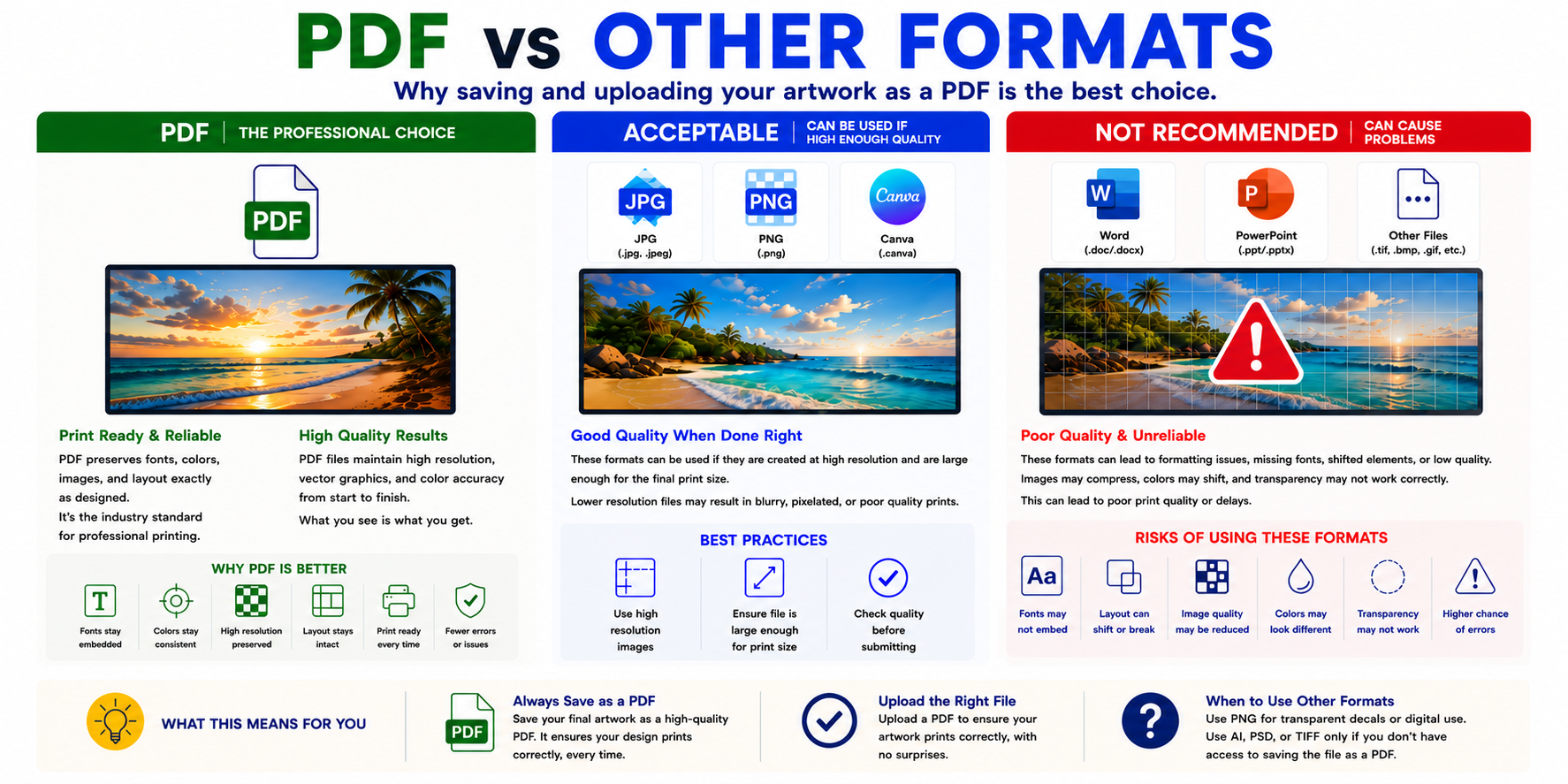
Adobe PDF vs Other File Formats: Why a PDF Is the Best Choice for Print-Ready Artwork
One of the most common issues in the print industry starts before the printer is ever turned on.
It starts with the artwork file itself.
The type of file you upload can dramatically affect:
- print quality
- color accuracy
- font consistency
- image sharpness
- transparency effects
- layout positioning
- overall production time
While there are many file formats available today, Adobe PDF remains the industry standard for professional printing for one simple reason:
It is the most reliable format for preserving your artwork exactly the way it was designed.
Why Adobe PDF Is the Preferred File Format
PDF stands for “Portable Document Format,” and that name explains exactly why print providers prefer it.
A properly saved PDF preserves:
- fonts
- layout structure
- vector graphics
- image quality
- transparency effects
- spacing and alignment
- embedded colors
In other words, what you design is what the printer receives.
That consistency is extremely important in professional printing, especially for:
- signs
- banners
- vehicle wraps
- decals
- trade show displays
- business cards
- brochures
- branded graphics
Unlike many other file formats, PDFs are designed to remain stable across different computers, operating systems, and software programs.
That reduces production issues and helps ensure your artwork prints correctly the first time.
PDFs Maintain Better Print Quality
Another major advantage of PDFs is image preservation.
High-quality PDFs can retain:
- sharp text
- smooth gradients
- high resolution images
- vector artwork
- scalable graphics without losing quality
This becomes especially important in large format printing, where files are often enlarged significantly.
A low-quality file may look acceptable on a monitor but appear blurry or pixelated once printed at full size.
PDFs help maintain the highest possible quality from design to final production.
PDFs Help Prevent Formatting Problems
Programs like Microsoft Word and PowerPoint were not originally designed for professional print production.
They were designed for:
- office documents
- presentations
- digital viewing
- internal communication
Because of that, artwork created in those programs can shift unexpectedly when opened on another computer or imported into production software.
Common problems include:
- missing fonts
- spacing changes
- moved graphics
- altered image sizes
- broken layouts
- color inconsistencies
- transparency issues
Something that looked perfect on your screen may open completely differently on another system.
This creates delays, rework, and avoidable production problems.
Why Word and PowerPoint Are Not Recommended
While Word and PowerPoint are useful for creating basic layouts or mockups, they are not considered professional design software for print production.
These programs often:
- compress images automatically
- reduce image quality
- substitute fonts
- flatten transparency incorrectly
- export inconsistent color data
- create sizing issues
Large format print equipment and production software are optimized for print-ready formats like PDF, not office document formats.
That is why professional printers strongly discourage using Word or PowerPoint as final artwork files whenever possible.
Which File Formats Are Acceptable?
While PDF is still the preferred option, some other file formats can work successfully if prepared correctly.
These may include:
- JPG / JPEG
- PNG
- Canva exports
- Adobe Illustrator files
- Photoshop files
However, these formats are only acceptable when the artwork is properly prepared.
That means:
- high enough resolution
- correct physical size
- proper color mode
- embedded images
- quality export settings
If these settings are incorrect, even an otherwise acceptable file type can produce poor print results.
JPG Files
JPG files are commonly accepted because they are easy to use and widely supported.
However, JPGs can become problematic if:
- the resolution is too low
- the file has been repeatedly compressed
- the image was downloaded from social media
- the artwork is scaled larger than intended
A high-resolution JPG can print well, but a low-resolution JPG will usually appear blurry or pixelated.
PNG Files
PNG files are often used when transparency is needed, especially for:
- decals
- cut graphics
- stickers
- logos
- web graphicsPNG files can work well for print if:
- resolution is high enough
- transparency is properly exported
- artwork is created at final size
However, PNGs are still raster images, meaning they can lose quality when enlarged too much.
Canva Files
Canva has become extremely popular because it is simple and accessible.
Artwork created in Canva can absolutely work for print, but export settings matter significantly.
For best results:
- export as PDF whenever possible
- use high-quality settings
- verify image resolution
- ensure proper sizing
- avoid screenshots or web images
The design platform itself is not the issue. The final exported file is what determines print quality.
Why Resolution Still Matters
No file format can fix low-quality artwork.
Even a PDF will print poorly if:
- images are low resolution
- screenshots are used
- artwork is too small
- graphics are stretched larger than intended
For professional printing, files should generally be created at:
- 300 DPI for smaller print items
- appropriate large-format resolution depending on viewing distance
A properly prepared PDF combined with high-resolution artwork creates the best possible print results.
Why Color Mode Matters Too
Color setup is another important factor.
For print production, artwork should ideally be designed in:
CMYK color mode
RGB colors created for screens can appear much brighter than what can actually be reproduced with ink.
Saving your final artwork as a CMYK PDF helps reduce unexpected color shifts during printing.
Best Practices Before Uploading Artwork
For the smoothest production process and best final results:
- Save artwork as a PDF whenever possible
- Use high-resolution images
- Design in CMYK color mode
- Create artwork at final print size
- Outline or embed fonts when possible
- Double check bleed and margins
- Avoid screenshots and compressed web images
Final Thoughts
The file you upload directly affects the quality of the final print.
PDF remains the professional standard because it preserves artwork more accurately, reduces production errors, and creates more predictable print results.
Other formats like JPG, PNG, Canva exports, Illustrator, and Photoshop files can still work when properly prepared, but they require the correct settings to avoid problems.
Programs like Word and PowerPoint may seem convenient, but they are not built for professional print production and can introduce formatting, quality, and compatibility issues that lead to delays and disappointing results.
When in doubt, exporting your artwork as a high-quality PDF is almost always the safest and most reliable choice.

Leave A Reply